Recent Posts

Responsive Ads Here
Showing posts with label Scripts. Show all posts

Tuesday, 22 March 2016

Count days between two days through javascript

Count days between two days through javascript

In real time applications this scenario is very important for counting days between two selected days.Here I have taken Start Date and End Date for counting days between start date and end date.For that I have taken two input fields as type date with ids as “startDate” ,”endDate”.

General Scenario: Suppose in your application, you are going to create new program for that you must select start and end date and also print how many days between two selected days by automatically.

Why we give id to the input field?
Because find and read appropriate input values.Here I have taken startDate and endDate as ids to the Start Date  and End Date fields. Because in script I can read entered values in input field through this ids only.So ids are must be unique.

<!DOCTYPE html>
<html>
<body>
<h1>Count between two days through javascript</h1>
<h4>Select Start Date</h4>
<input type="date" id="startDate" onChange="onDateChange()"/>
<h4>Select End date </h4>
<input type="date" id="endDate" onChange="onDateChange()"/>
<p>Difference is :<p id="demo"> </p></p>
<script>
function onDateChange()
{
var sDate=new Date(document.getElementById("startDate").value);
var eDate=new Date(document.getElementById("endDate").value);
var timeDiff=Math.abs(eDate.getTime()-sDate.getTime());
var diffDays=Math.ceil(timeDiff/(1000*3600*24));
document.getElementById("demo").innerHTML = diffDays;
}
</script>
</body>
</html>

Process:

   1.Whenever  we select dates ,action goes to script with onDateChange() function
   2.Read startdate and endDate values
   3.Find time difference between two selected days
   4.Find days difference between two selected days 
  5.For print out put on page ,I have taken <p id="demo">  ,in script assign values I used document.getElementById("demo").innerHTML = diffDays;

Note : You can do same thing in jquery  also count days between two selected dates.
You  can watch videotutorial on this example. 

count days between two dates through Jquery

count days between two dates through Jquery


In real time applications this scenario is very important for counting days between two selected dates.
Here I have taken Start Date and End Date for counting days between start date and end date.For that I have taken two input fields as type date with ids as “startDate” ,”endDate”.

General Scenario : Suppose in your application, you are going to create new program for that you must select start and end date and also print how many days between two selected dates by automatically.
Why we give id to the input field?
Because find and read appropriate input values.Here I have taken startDate and endDate as ids to the Start Date  and End Date fields.Becacuse in script I can read entered values in input field through this ids only.So ids are must be unique.

<!DOCTYPE html>
<html>
<body>
<h1>Count between two days through JQuery</h1>
<h4>Select Start Date</h4>
<input type="date" class="date"  id="startDate"/>
<h4>Select End date </h4>
<input type="date" class="date"  id="endDate"/>
<p>Difference is :<p id="demo"> </p></p>
<script src="https://ajax.googleapis.com/ajax/libs/jquery/1.12.0/jquery.min.js"></script>
<script>
$(function() {
$('.date').change(function() {
var sDate=new Date($("#startDate").val());
var eDate=new Date($("#endDate").val());
var timeDiff=Math.abs(eDate.getTime()-sDate.getTime());
var diffDays=Math.ceil(timeDiff/(1000*3600*24));
document.getElementById("demo").innerHTML = diffDays;
 });
});
</script>
</body>
</html>

Process :
      1.Whenever  we select dates ,action goes to script with change function
      2.  Read startdate and endDate values
      3.  Find time difference between two selected dates
      4. Find days difference between two selected dates
    5. For print out put on page ,I have taken <p id="demo"> ,in script assign values I used document.getElementById("demo").innerHTML = diffDays;

Note : You can do same thing in  javascript also count days between two selected dates
You  can watch video tutorial on this example.


Saturday, 5 March 2016

What is Path and Class Path in java ?

To run and compile java programs, we need an Environment.JDK provide java environment through PATH and CLASS PATH either command-line (or) Environment variables. Command line for Temporary setting,environment variables for Permanent setting  paths.

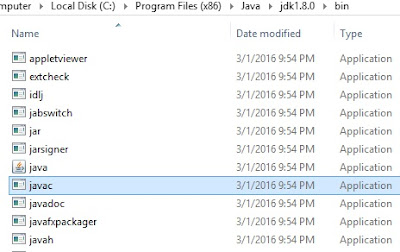
PATH :- PATH is where all Java libraries ,supported jars like javac,javah ,java,javap ,etc .All tools are lies in JDK bin folder ,so we need to set path for run our program successfully.

suppose if you want to compile a java program ,we do like this.

C:\Program Files (x86)\Java\jdk1.8.0\bin>javac  Test.java

Javac.exe file checked  on (C:\Program Files (x86)\Java\jdk1.8.0\bin ) when we press enter for above program Test.java .So we happily compile our program ,because javac.exe file lies in bin folder of JDK.


What  will happen  ? if we are not set path and compile a program?
My intension is, compile above program.so for that i just set path like this
C:\ >set path=”C:\>Program Files (x86)>”;
C:\>javac Test.java
In Program Files (x86) there is no javac.exe file to compile our program,so we will get an error on command program “ javac is not recognized as an internal or external command”


Class Path :- The location where required .class files are available  JVM or java compiler that specifies the location of user defined classes and packages.
When we executing java programs ,the JVM finds and loads classes.The class path tells jvm ,where to look in the file system for  defining there classes.
To run program ,we should pass our .class to JVM
The JVM searches and loads classes in this order through rt.jar
       1.Boostrap classes
       2.Extension classes
       3.User defined packages and libraries


Setting class path as temporary
C:\Program Files (x86)\Java\jdk1.8.0\bin> set ClASSPATH=”C:\Program Files (x86)\Java\jre8\lib\rt.jar>”;

C:\Program Files (x86)\Java\jdk1.8.0\bin>java Test