Recent Posts

Responsive Ads Here
Showing posts with label Java Interview Questions. Show all posts

Saturday, 5 March 2016

What is Path and Class Path in java ?

To run and compile java programs, we need an Environment.JDK provide java environment through PATH and CLASS PATH either command-line (or) Environment variables. Command line for Temporary setting,environment variables for Permanent setting  paths.

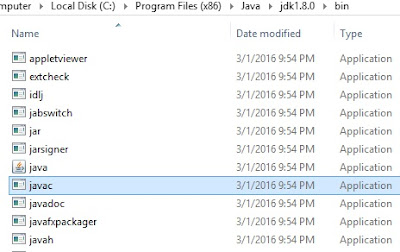
PATH :- PATH is where all Java libraries ,supported jars like javac,javah ,java,javap ,etc .All tools are lies in JDK bin folder ,so we need to set path for run our program successfully.

suppose if you want to compile a java program ,we do like this.

C:\Program Files (x86)\Java\jdk1.8.0\bin>javac  Test.java

Javac.exe file checked  on (C:\Program Files (x86)\Java\jdk1.8.0\bin ) when we press enter for above program Test.java .So we happily compile our program ,because javac.exe file lies in bin folder of JDK.


What  will happen  ? if we are not set path and compile a program?
My intension is, compile above program.so for that i just set path like this
C:\ >set path=”C:\>Program Files (x86)>”;
C:\>javac Test.java
In Program Files (x86) there is no javac.exe file to compile our program,so we will get an error on command program “ javac is not recognized as an internal or external command


Class Path :- The location where required .class files are available  JVM or java compiler that specifies the location of user defined classes and packages.
When we executing java programs ,the JVM finds and loads classes.The class path tells jvm ,where to look in the file system for  defining there classes.
To run program ,we should pass our .class to JVM
The JVM searches and loads classes in this order through rt.jar
       1.Boostrap classes
       2.Extension classes
       3.User defined packages and libraries


Setting class path as temporary
C:\Program Files (x86)\Java\jdk1.8.0\bin> set ClASSPATH=”C:\Program Files (x86)\Java\jre8\lib\rt.jar>”;

C:\Program Files (x86)\Java\jdk1.8.0\bin>java Test 


How to Set Path and class path

There are two ways to set PATH and CLASS PATH in two ways
          
      1. Temporary (Command Line)
      2. Permanent (Environment Variables)

1.We can set Path and ClassPath through command line

Go to C Drive and find where JDK is installed and copy that Path and paste in command prompt


set path as temoprary
Set Path
  
Note : you will not get any message for setting PATH successfully

2.we can set CLASSPATH through command line


2.We can set PATH and Class Path as permanently

First Go to MyComputer Properties ->Advanced System Settings ->Environment Variables -> Click on New


Copy Path URL and Paste it in below


Copy Class Path URL and Paste it in below


done we successfully set path and class path as temporary and permanently. 


Watch video to set path and class path  for permanently

What is Java Run time Environment (JRE) ?

Technical Description:-The Java Runtime Environment is the part of JDK.JRE provides the minimum requirements for executing a Java Applications.JRE consists of the JVM (Java Virtual Machine), Core classes and supporting files.

Note: you can find JRE folder in Java Development Kit (JDK)

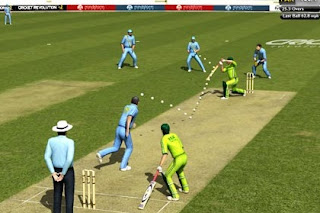
General Description: - Suppose if we want to play a cricket, first we need a play ground and also we need players. Just assume, our match is a java program, to run our program we need an environment. If we want to play a cricket we need a ground (JRE) and Supporting files (Players), without players we cannot play a cricket and also without ground (JRE), we cannot play a cricket both are interrelated.

enuretoday.blogspot.com


Play Ground is a JRE
Cricketers are supporting classes
Assume JVM is an empire

Where we use JRE in Java Programs?

To compile and run our java programs we have to set path and class path.We use JRE for set Class path to run our programs.

Thursday, 3 March 2016

Java Development Kit

What is Java Development Kit (JDK)?

The Java Development Kit (JDK) is an implementation of either one of the Java SE, Java ME, and Java EE platforms. The JDK includes a private JVM and a few other resources to finish the development of Java Application.Java initially developed by SUN micro systems and occupied Oracle Corporation.Java is a open source.You can Download JDK and Its documentation 
what is open source and what is java development kit (JDK)
JAVA

What is a open source ?

Open-source software (OSS) is computer software with its source code made available with a license in which the copyright holder provides the rights to study, change, and distribute the software to anyone and for any purpose. Open-source software may be developed in a collaborative public manner.


Courtesy : Wikipedia